Print the Information on the Screen
Click on the portion of the screen you wish to print.Click on the ''right-mouse'' button (The right-mouse button is the button on right hand side of your mouse).A menu will pop up.Choose the ''Print'' option from that Menu.The portion of the screen you just clicked should now print. | 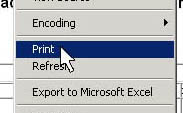 |